Resource filters
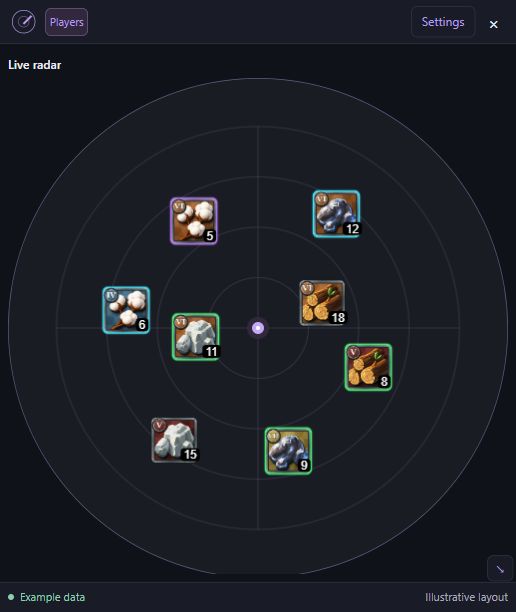
Filter wood, ore, fiber, hide, and stone by tier and enchantment.
- Separate gathering nodes and resource creatures
- Hide the resource types you do not need
AOVision · Windows
Separate Radar, Players, and Broad Player Detector windows for Albion Online. Choose what you see, arrange each overlay, and save your setup.
Windows 10 / 11 · 64-bit · Internet required
Captured in Albion Online
Watch the radar during gathering, adjust its size, explore resource filters, and see the nearby-player list in use.
Keep nearby resource markers in view alongside your gathering gameplay.
Select a screenshot to view it full size.
A closer look
From gathering routes to dungeon entrances, explore the views you can build around the way you play.
See resource types, tiers, and enchantments at a glance. Keep the nodes you want in view.
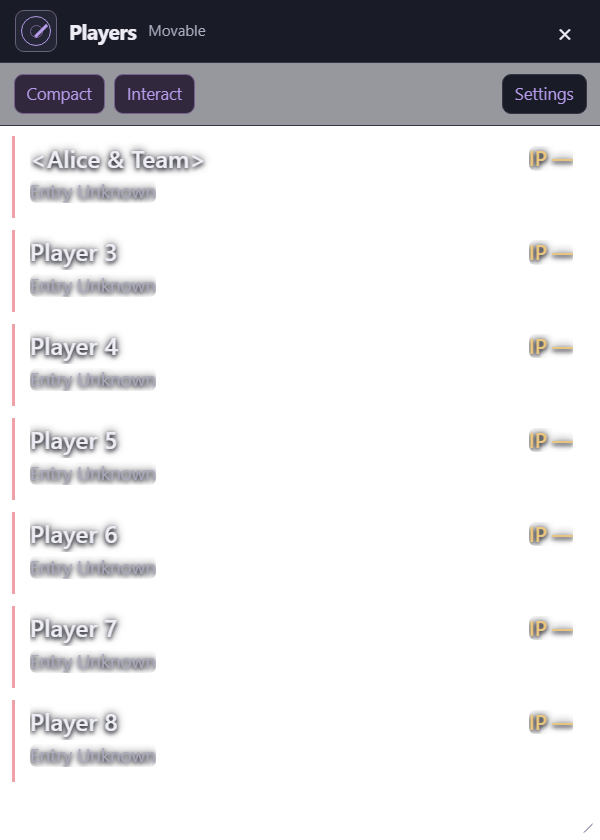
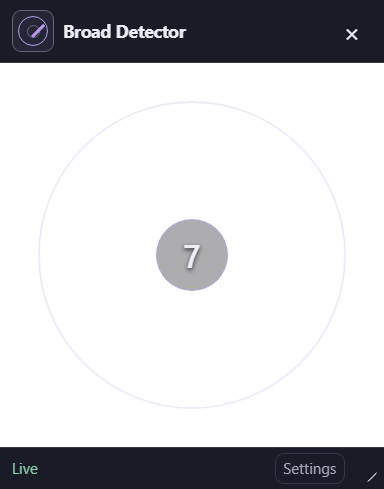
App interface with illustrative data. What appears depends on available game traffic and your filters. Exact player positions and distances are unavailable.
Inside the workspace
Keep your radar, player list, and detector in separate windows. Shared settings and filters keep the information consistent across your workspace.
Filter wood, ore, fiber, hide, and stone by tier and enchantment.
Choose which supported creatures appear in your overlay.
Display markers for supported locations and objects.
Use a compact list for names and item power, or switch to Detailed mode for available guild, mounted status, health, and reported equipment.
See a live count of players matching your visibility filters. Choose sound alerts and brief Detector flashes by player category.
Move and resize Radar, Players, and Broad Player Detector independently, with one shared Settings window.
Displayed information depends on available game traffic. Exact player positions and distances are unavailable. Experimental Detector arrival directions are estimates, not live tracking; mounted accuracy remains unvalidated.
Base gear IP estimates exclude item quality, specialization, and overcharge. Inspecting a player in Albion can temporarily provide the game’s reported average IP.
External by design
AOVision reads game network traffic in a separate app.
No code injection required.
Loads extra code directly into the game’s process.
Exposed to injection checks
Reads network traffic from a separate app.
Avoids injection-related changes
Disclaimer: No injection does not mean undetectable or ban-proof. Detection may still occur through gameplay analysis, player reports, or other anti-cheat checks.
Plans & access
Weekly, monthly, or lifetime access to the same AOVision workspace. Prices shown are in US dollars, plus applicable tax at checkout. Available in the United States and supported billing countries listed in the launcher.
Access one week at a time, with a one-day trial for eligible accounts.
Ongoing access with a monthly subscription and an eligible one-day trial.
Non-expiring access for the Discord account used for your purchase.
Eligible Discord accounts can start one 24-hour trial on the weekly or monthly plan. A card is required. Choose your plan before checkout: after the trial, it automatically charges $4.99 every week or $14.99 every month, unless you cancel before the deadline shown in the launcher and Stripe.
Use Manage billing in the launcher to open your AOVision billing page and cancel your subscription. No separate Link account is needed. Scheduled cancellation stops the upcoming renewal and keeps otherwise eligible access until the trial or paid period ends. Prior trial or purchase history can make an account ineligible. Lifetime purchases do not include a trial.
Lifetime access has no scheduled expiry and no recurring charge. Every plan requires online account verification; refunds, disputes, account restrictions, or account deletion can end access. Existing subscriptions keep their agreed billing terms. Applicable tax is added at checkout. Stripe Managed Payments, through Link, handles checkout and sales tax for new purchases. Checkout may offer payment in your local currency. Read our terms and billing policy.
Get started
Your Discord sign-in connects your launcher account with its trial, subscription, or lifetime access.
Sign in on this website or in the launcher with the Discord account you want to use for AOVision.
Choose weekly, monthly, or lifetime on this website or in the launcher. Sign in with your Discord account, choose your actual billing country, and continue to Stripe-hosted checkout. Eligible weekly and monthly accounts see the card-required one-day trial before checkout.
Return to the launcher and choose Refresh access. The radar opens once your account’s eligibility is confirmed.
Before you install
Questions & support
Yes. Choose a plan on this website or in the launcher, then use the same Discord account to sign in to AOVision 1.2.9 or later. Purchases are open in the United States and supported countries listed in the launcher. Eligible weekly and monthly accounts receive a card-required one-day trial. Downloading or signing in alone does not grant access. The installer is currently unsigned.
Choose a plan on this website or in the Windows launcher while signed into the Discord account you want to license. Complete Stripe-hosted checkout, then sign into the launcher with that same Discord account and refresh access.
Eligible accounts can choose a weekly or monthly plan and start one 24-hour trial with a card required. After the deadline, the chosen plan charges $4.99 per week or $14.99 per month unless canceled first. The launcher shows your trial deadline. Manage billing opens your AOVision billing page directly from your signed-in launcher. No separate Link account is needed. Previous trial or purchase history can make an account ineligible; deleting or recreating an account does not automatically reset retained trial history. Lifetime has no trial.
Pay $149.99 USD once for non-expiring access tied to your purchasing Discord account. There are no subscription renewals. Internet access and account verification remain required; refunds, disputes, account restrictions, and account deletion can end access. Lifetime replaces the yearly option for new purchases; existing yearly subscriptions are not automatically converted.
Use Manage billing in the launcher to open your AOVision billing page and cancel future renewals. This works for both new and existing Stripe subscriptions, without a separate Link account. Otherwise eligible access continues until the trial deadline or paid period ends. Cancel before the trial deadline to stop the first subscription charge. Refunds, disputes, account restrictions, or failed online access verification can prevent use. Canceling renewal does not itself refund a payment.
No. Exact player positions and distances are unavailable. Detector arrival arcs and fading memories are experimental estimates, not live tracking. Mounted accuracy remains unvalidated.
Separate Radar, Players, and Broad Player Detector windows, with saved layouts, per-window Radar Mode, and shared Settings. The updated launcher also supports the new prices, lifetime access, trial deadlines, and billing management. The Detector has a filtered player count, category flashes, and experimental arrival memory. Closing an overlay hides that view while detection continues; Show overlay windows in the launcher brings the views back.
Compact Players mode focuses on names and item power. Detailed mode shows available equipment, guild, mounted status, and health information. Visual flashes appear in the Broad Player Detector. Sound and Detector flash choices follow the shared player categories and Ignore List.
No. Internet access is required for sign-in and ongoing account checks. Radar detection stops if access cannot be verified.
Installed builds offer manual update checks and downloads in the launcher. See the linked release notes for the current installer and update limitations.
AOVision is an independent project. It is not affiliated with or endorsed by Albion Online or Sandbox Interactive.